Bike Alarm/Finder
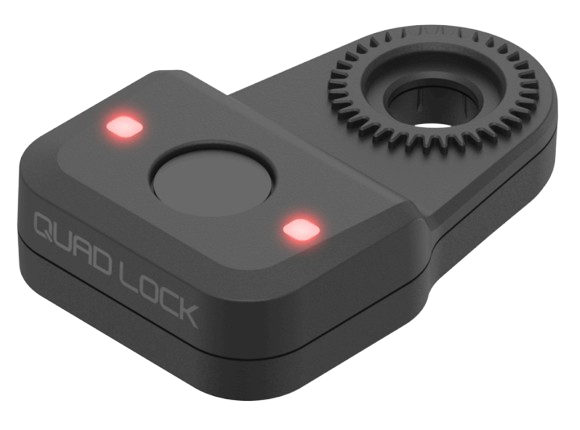
Protect your ride. The Quad Lock Bike Alarm and Finder stops a theft as it happens, and helps you find your bike with Apple Find My.
Tutorials
FAQ
Will my Out Front Mount work with the Bike Alarm/Finder?
Will my Out Front Mount work with the Bike Alarm/Finder?
To attach the Bike Alarm/Finder to an Out Front Mount, your mount needs to be a version with our 360 connection. Use this guide to check compatibility and find the right installation position.
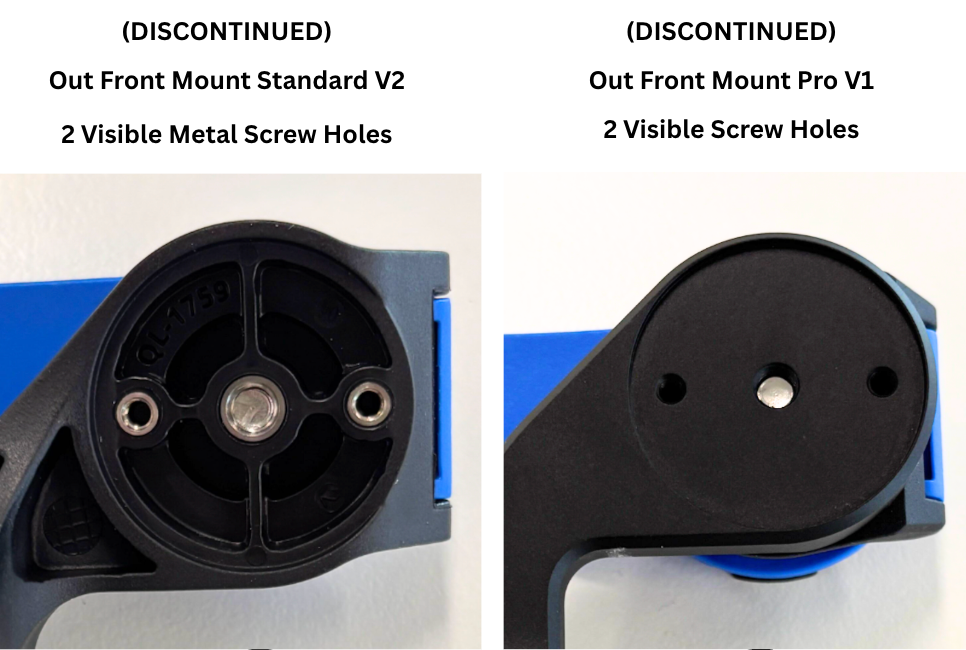 Not Compatible
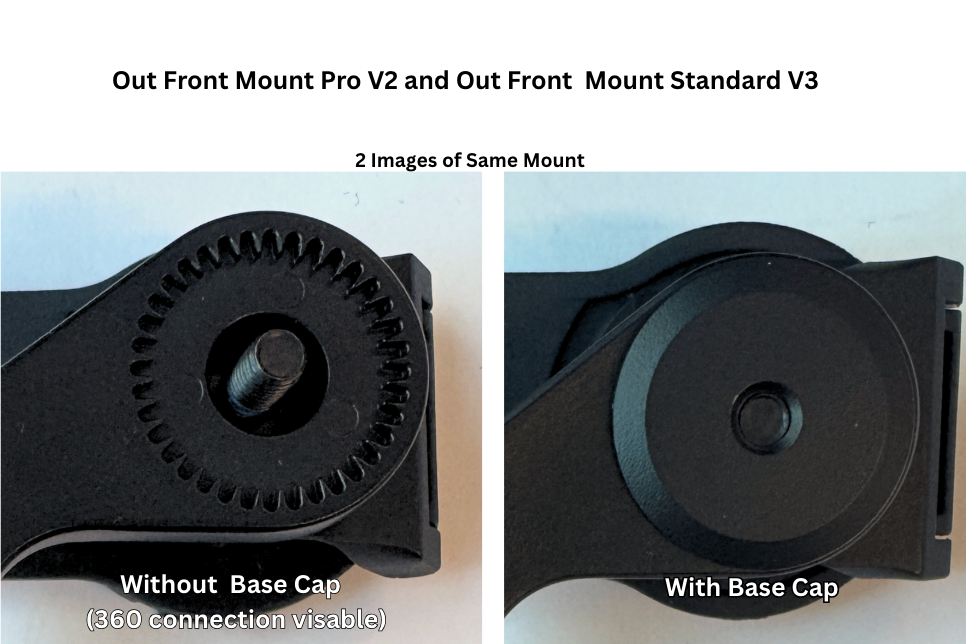 Compatible
Check your Out Front Mount is compatible
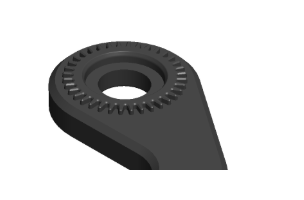
To check if your Out Front Mount is compatible with the Bike Alarm/Finder, look at the underside of the mount head.
Your mount is compatible if you can see a 360 connection, like the example shown below.
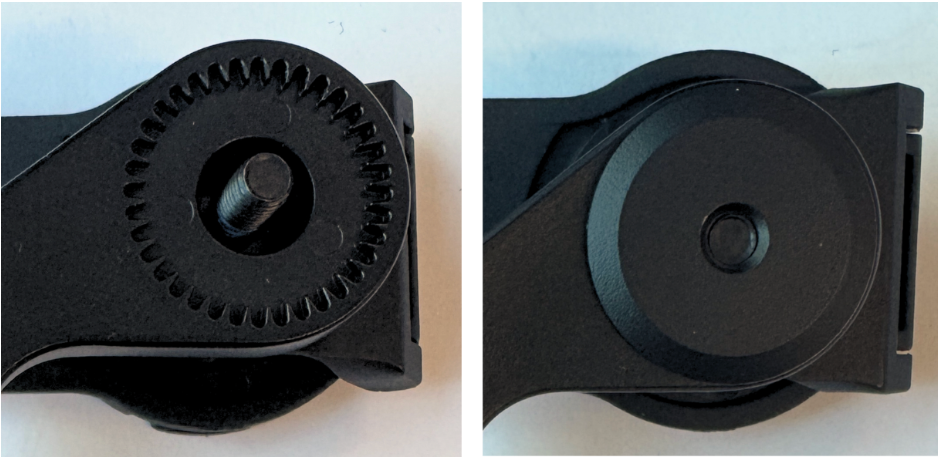
Installing the Bike Alarm/Finder
If your Out Front Mount has a 360 connection, the Bike Alarm/Finder can be installed in either of the following positions:
Under the 360 Lever Head
On the underside of the Out Front Mount
as shown in the diagram below.
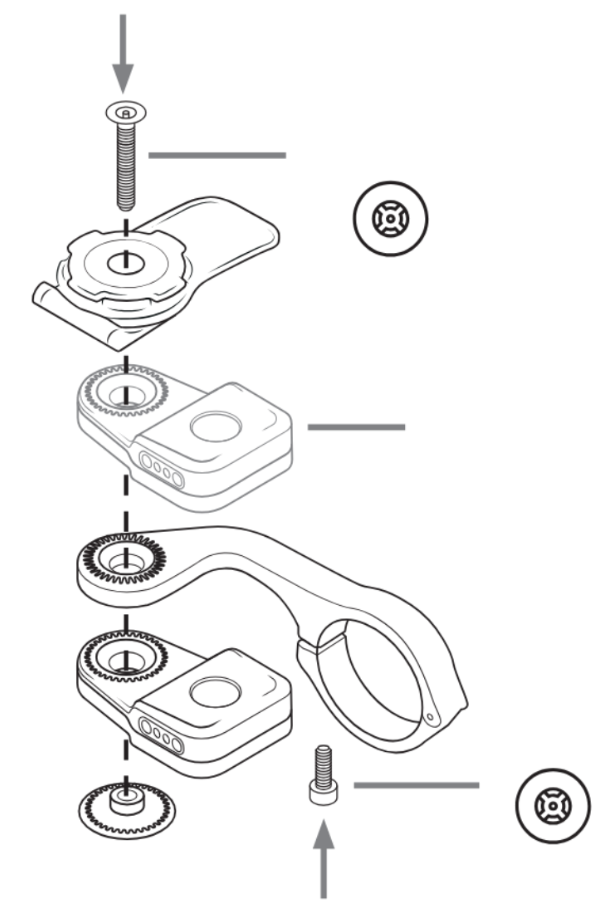
Choose the position that best suits your bike setup.
More Info on Our Out Front Mounts
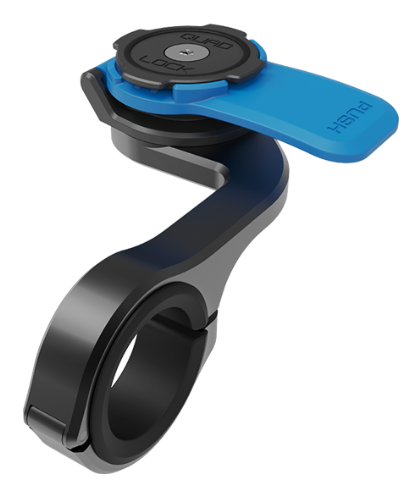
- Black anodised CNC aluminium mounting arm
- Classic Blue Lever Head
- Underside of the mount is flat with 2 visible screw holes
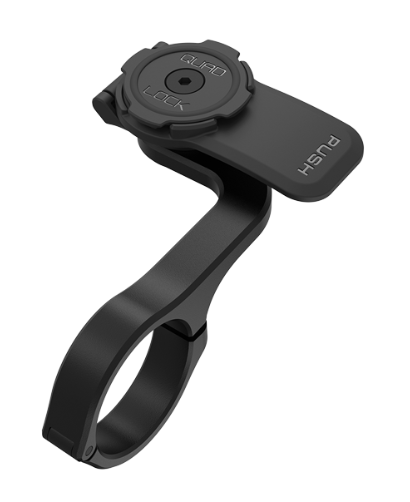
- Black anodised CNC aluminium mounting arm
- Black Pro Lever Head
- Detachable threaded base cap
- 360 connection on top and underside of mount
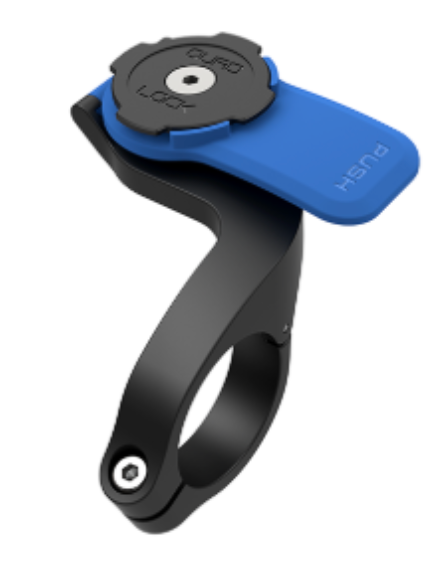
- Black carbon-filled nylon mounting arm
- Classic Blue Lever Head
- Underside of the mount has 2 visible metal screw holes
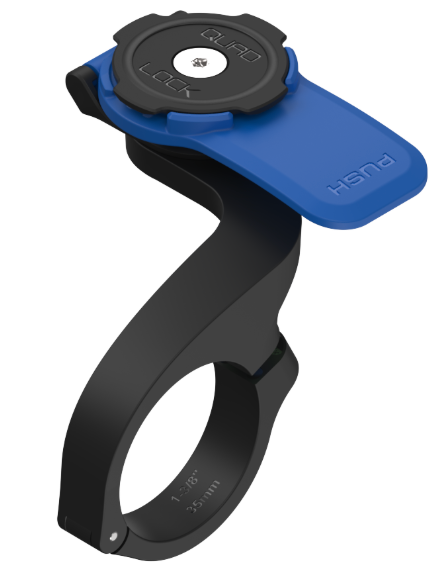
- Black carbon-filled nylon mounting arm
- Classic Blue Lever Head
- Detachable threaded base cap
- 360 connection on top and underside of mount
- Hinge location flipped from previous version
Will My Stem Cap Mount Work With The Bike Alarm?
The Stem Cap Mount and Stem Cap Mount Adjustable are both compatible with the Bike Alarm and Finder, but an anti-theft screw is not available for the stem cap itself, so the mount can still be removed with standard tools.
How do I share it with someone else or add another user's fingerprint (multiple users)?
Tracking and alarm access are shared separately.
Share Tracking Access
- Open Find My.
- Select your Bike Alarm.
- Choose Share Item and follow the prompts.
You can share tracking access with anyone who has an Apple Account.
Share Alarm Access
- The current admin holds their finger on the fingerprint sensor for 10 seconds, until the device beeps and the LEDs turn purple.
- The new user then taps the sensor 10 times with the finger they'd like to register.
Once enrolled, they'll be able to arm and disarm the alarm using their fingerprint.
How many fingerprints can it store?
Up to 20 can be registered at one time.
Can I remove just one fingerprint?
Individual fingerprints can't be removed once they've been enrolled. To remove a fingerprint, you'll need to perform a full factory reset, which will remove all enrolled fingerprints from the device.
See next FAQ for reset steps.How do I reset the Bike Alarm & Finder?
There are two ways to reset your Bike Alarm & Finder.
Recommended: Reset via Find My
- Open Find My.
- Select your Bike Alarm & Finder.
- Scroll to Settings.
- Tap Remove and follow the prompts.
This will reset the device, remove it from Find My, and erase all enrolled fingerprints.
Alternative: Physical Reset
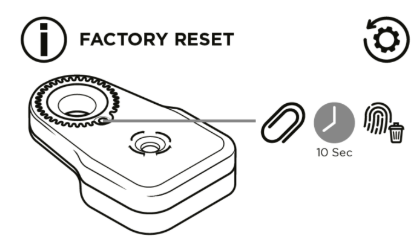
- Remove the Bike Alarm & Finder from its mount to access the reset button.
- Use a paperclip to press and hold the button for 10 seconds until you hear a long beep.
If you use the physical reset method, you'll also need to manually remove the Bike Alarm & Finder from Find My before setting it up again.
What should I do if my fingerprint won't disarm the alarm?
First, make sure both your finger and the fingerprint sensor are clean and dry, then try again.
If the alarm still won't disarm, you can disable it using Find My. Open the app, select your Bike Alarm, then tap Play Sound and let it play for a few seconds. The alarm will then be disabled.
Will I get a phone notification if my bike is moved or the alarm goes off?
Your Bike Alarm & Finder won't send a notification to your phone if your bike is moved or the alarm is triggered. This is because the Find My network is designed to help you locate your device, rather than send real-time movement or alarm notifications.
This is expected behaviour and not a fault with your Bike Alarm & Finder. To check its location, simply open the Find My app and view its location there.
Why didn't the alarm go off when I bumped it right after arming?
Your Bike Alarm & Finder needs at least 3 seconds of stillness before the alarm can fully arm. If your bike is moved or bumped during this time, it won’t arm straight away and will continue trying until it detects 3 seconds of stillness. This is expected behaviour and helps prevent the alarm from arming while your bike is still being moved or handled.
The Alarm beeps at random times on its own.
If your Bike Alarm & Finder occasionally beeps on its own, this may be due to Apple's built-in anti-stalking safety feature.
When the Bike Alarm & Finder has been separated from its owner for an extended period, it may briefly beep when movement is detected. This is designed to alert someone that an unknown Find My accessory may be travelling with them.
This feature is part of Apple's Find My network and cannot be disabled.
Do I have to use my ring finger for the admin?
You can use any finger as the admin fingerprint for your Bike Alarm & Finder.
We recommend using your ring finger because it's easy to remember and is less likely to be used when regularly arming or disarming the alarm. This helps reduce the chance of accidentally entering fingerprint enrolment mode.
My user fingerprint isn't always recognised.
If your Bike Alarm & Finder doesn't consistently recognise a user fingerprint, try enrolling the same finger again as an additional fingerprint. This can help improve recognition and make it more reliable when arming or disarming the alarm.
Please note, this only applies to user fingerprints. The admin fingerprint cannot be re-enrolled this way.
Can I add my admin fingerprint as a user print too?
No. The admin fingerprint should not be enrolled again as a user fingerprint, as this will cause the admin fingerprint to stop working.
If this happens, you'll need to perform a factory reset and set up your Bike Alarm & Finder again.
Can the Bike Alarm & Finder be mounted under the Wireless Charging Head?
The Bike Alarm & Finder can be mounted underneath the Waterproof Wireless Charging Head (WCH-WP), with sufficient clearance to access the fingerprint scanner.
It is not recommended for use underneath the 12–24V Hardwired Wireless Charging Head (HW-WCH), as there is insufficient clearance to comfortably access the fingerprint scanner.
The MAG Wireless Charging Head and Wireless Charging Head, designed for indoor use, are not compatible with the Bike Alarm & Finder.
Does the Bike Alarm & Finder work with Android phones, like Samsung?
The Bike Alarm Finder uses the Apple Find My Network, so currently Android / Google Find My Devices aren't supported
Can I use it only as an alarm, without an iPhone?
No. An iPhone/Apple device is required for the initial setup of the Bike Alarm & Finder. Without this setup, you won’t be able to use the alarm or tracking features.
I plugged it in to charge and the blue lights are flashing. Is it charging?
Flashing blue means the device is in pairing mode and waiting to be set up in Find My. While charging, the light shows solid blue, and it turns solid green when fully charged. One full charge lasts about 6 months.
Which mounts can I attach the Bike Alarm & Finder to? Can I fit it to a Fork Stem Mount, moto mount or frame?
While the Bike Alarm & Finder can be mounted to any 360 mount, it is designed to be mounted on our Out Front Mount/Pro (versions purchased after 2023), Stem Cap Mount, Saddle Rail Adaptor and Bottle Cage Adaptor.
- Out Front Mount: Your mount needs to be a version with our 360 connection. It can be installed under the 360 Lever Head or on the underside of the Out Front Mount.
- Stem Cap Mount: The Stem Cap Mount and Stem Cap Mount Adjustable are both compatible.
- Saddle Rail Adaptor: fits standard 44mm saddle rails, under your seat.
- Bottle Cage Adaptor: fits standard 64mm bottle cage mounting points.
It can be mounted underneath the USB Waterproof Wireless Charging Head, but isn't recommended under the 12–24V Hardwired Wireless Charging Head or Mag Wireless Charging Heads.
Can I use it on a motorcycle or scooter?
The Bike Alarm & Finder is built for bicycles. While it can physically be fitted to our 360 motorcycle mounts (e.g. Handlebar Mount PRO, Fork Stem Mount, Brake Reservoir Mount), we don't recommend it.
Car mounts and adaptors, such as the 1" Ball Top Cap Adaptor, aren't intended for it.
Can my Out Front Mount hold the Bike Alarm & Finder and Light/Camera Adaptor together? Is the screw long enough?
If your Out Front Mount has a 360 connection, the Bike Alarm & Finder can be installed under the 360 Lever Head or on the underside of the Out Front Mount, so it can be stacked in the 360 system with other accessories such as the Light/Camera Adaptor.
If you also add a Waterproof Wireless Charging Head, you'll need a longer M5 x 50mm screw, which isn't included with the alarm. It's included in our Replacement and Anti-Theft Screw Kits.
Please note, the Light/Camera Adaptor isn't compatible with the Stem Cap Mount.
Can I use the Bike Alarm & Finder just as a finder and silence the alarm?
Yes. If you never arm the alarm, it won’t go off. Tracking works regardless of whether the alarm is armed, you just need to set up the device in Apple’s Find My app first.
Please note that when the Bike Alarm & Finder has been separated from its owner for an extended period, it may briefly beep when movement is detected. This is Apple's built-in anti-stalking safety feature, part of Apple's Find My network, and cannot be disabled.
Can I still track my bike in Find My if the alarm isn't armed or set?
Yes. If you never arm the alarm, it won’t go off. Tracking works regardless of whether the alarm is armed, you just need to set up the device in Apple’s Find My app first.
Does the Bike Alarm & Finder have GPS, or does it need Wi-Fi or Bluetooth to work?
The Bike Alarm & Finder uses Apple’s Find My network and does not have built-in GPS. It doesn’t need a Wi-Fi connection or an ongoing Bluetooth connection to your phone.
How does the alarm work when the bike is being moved?
When armed, the Bike Alarm & Finder detects movement and emits two short, one-second warning beeps, spaced slightly apart. If movement continues, it sounds a 15-second alarm. The alarm will keep triggering while movement continues, until the device is disarmed.
How hard is it to remove the Bike Alarm & Finder from my bike? Does it use anti-theft screws?
The Bike Alarm & Finder comes with standard black stainless steel screws, which can be removed using a basic hex key. Anti-theft screws are also included and can be fitted in place of the standard screws.
The anti-theft screws require the special tool supplied with the screw kit. This tool has a unique hex design specifically for Quad Lock anti-theft screws, making them harder to remove with standard tools.
Can I stack the Bike Alarm with a Vibration Dampener on my motorcycle or scooter mount? Is the screw long enough?
We don't recommend it. The Bike Alarm & Finder is designed for bicycles. While it can be fitted to any Quad Lock 360 mount, including our motorcycle mounts, we don't recommend using it on a motorcycle.
The Vibration Dampener may also interfere with fitting the Bike Alarm & Finder, preventing the two from being attached together.
Why has my device stopped recognising my fingerprint?
If your device was previously recognising your fingerprint but has stopped, it may have entered low-power mode. When this happens, the Finder function will continue to work, but the fingerprint and alarm features are temporarily disabled to conserve battery. To restore all functions, simply give your device a full charge.
I've lost the charging cable for my Bike Alarm & Finder. Can I get a replacement?
The Bike Alarm & Finder charges with the USB-C to magnetic pogo charge cable that comes in the box. At this stage, we don't have this cable sold separately as a spare part.
Tech Specs
Tech Specs
• Locating function via Apple Find My
• No apps to download, install or update
• Fingerprint sensor to arm and disarm the alarm (stores up to 20 fingerprints)
• Smart three-stage movement alarm that escalates based on movement analysis
• Best-in-class 93 dBA alarm
• IP66 waterproof construction
• Versatile mounting options: OFM, SCM, SRA and BCA
• Simple device sharing for family and friends
• Internal rechargeable lithium battery
• Up to six months of battery life between charges
Dimensions
• Size (approx.): 38 mm (W) × 59.5 mm (H) × 16 mm (D)
• Weight: 22 g


